iOS development with my Mac switched off
by Marcello Gonzatto Birkan, Founder
iOS development always had a physical prerequisite: the Mac open in front of me. Xcode, a simulator, a cable, me sitting there. This week I took the Mac out of the loop and the loop still closed — write the Swift, build it, install it on an iPhone, walk the screen, photograph what came up, open the PR.
The one doing that is a Claude Projects thread, running on a Linux VM with no Xcode and no simulator. Revyl fills in what is missing: its CLI ships the code to a macOS runner that builds the .app, then opens a simulated iPhone in the cloud that the thread itself drives and photographs. Because all of it is a conversation, the device I type from stops mattering — I ran this one from the desktop, but sending the task from a phone is the same gesture.
What actually happened
I tried it on Coloreku, a colour game I am building in SwiftUI. I sent a task and went to do something else.
This time the task was a fix, and it is only fair to say so: what I have run end to end is a bug, not a new feature. But nothing in the loop depends on that. Write code, build, install, walk the screen and come back with proof is the same work whether the change is one line or a whole screen.
The bug was one of ordering: with Quick Mode off, tapping an empty cell already painted it, when it should only select the cell and wait for a colour to come from the palette. What came back:
tapCellreordered inGameViewModel, which is where the wrong ordering lived- 12 tests written for both input modes
- a remote build and a cloud device, with the flow walked end to end
- two photos of the screen, taken during the test
- PR #4 open, +233 −27, checks green
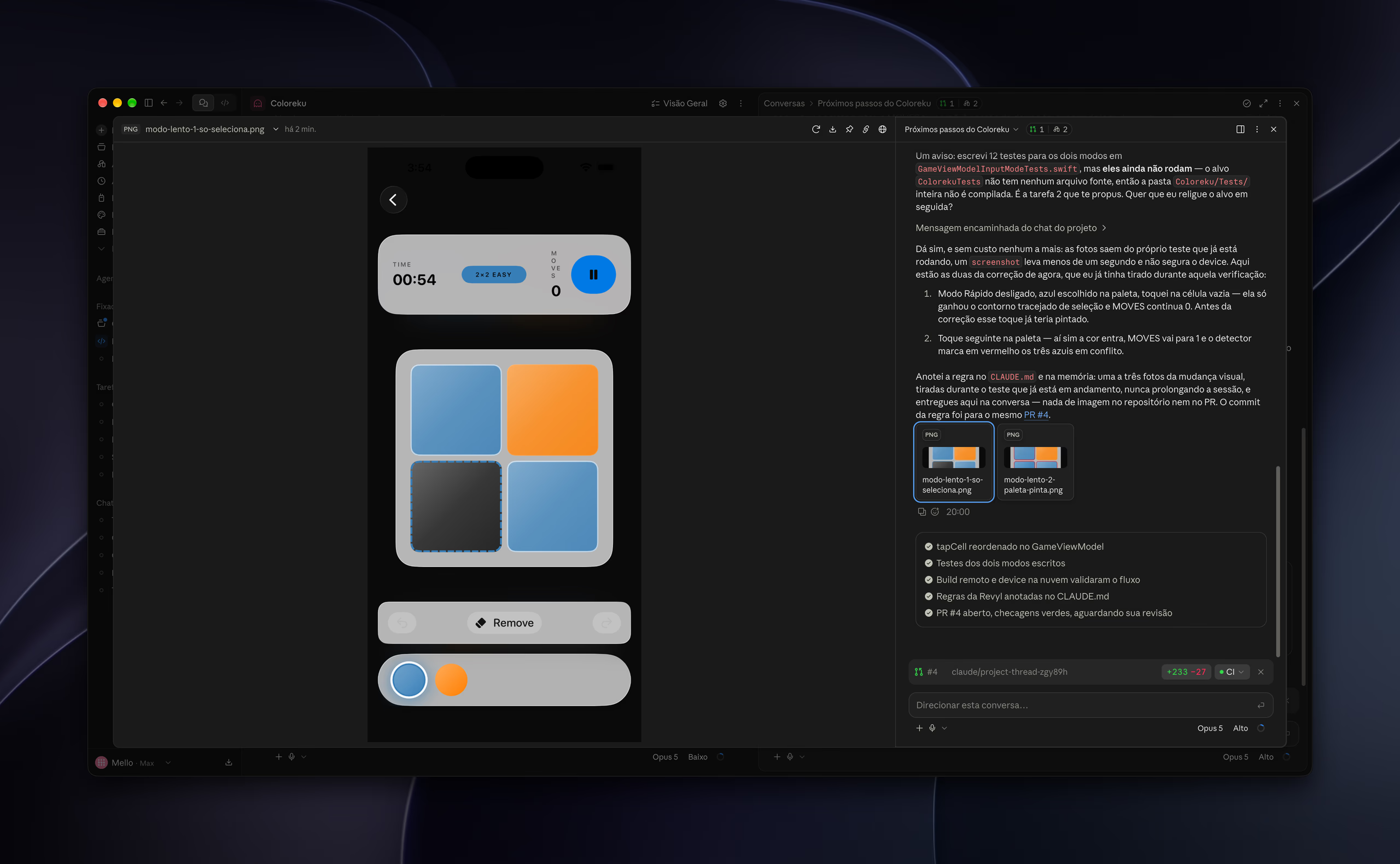
The photos are the part that changed how I work. The first one shows the 2×2 board with blue picked in the palette and the empty cell tapped: it only got the dashed selection outline, and the MOVES counter is still at 0. Before the fix, that tap would already have painted. The second shows the next tap on the palette, the colour landing, MOVES going to 1, and the conflict detector marking the three clashing blues in red.
A green check says the code ran. The photo says the screen came out the way I asked for. Those are different claims, and until now only the first one fit inside a thread.
What still does not work
The 12 tests do not run yet. The ColorekuTests target has no source files, so the whole test folder is never compiled — a problem of mine that predates all of this, which the agent found and told me about instead of pretending it was not there. The PR is open waiting for my review; it has not been merged.
And the fence is tighter than it looks:
- Simulator only. Camera, sensors, push and real-device performance stay out of reach.
- Swift iterates slowly. Every change needs a fresh remote build. This is for delivering and proving a change, not for tuning an interface.
- One device at a time on the free plan. Two threads reaching for it at once will wait or fail, so I keep it to a single verification thread.
- The bill arrives in two places: thread tokens, and simulator minutes at US$0.15 each above the free quota. A device left running is the most expensive mistake available here.
- The runner's Xcode stops at 26.5. An app built against the iOS 27 SDK simply will not compile there.
Worth saying plainly: neither Anthropic nor Revyl claims to have tested this flow end to end. Revyl's own documentation is explicit that it does not assert a full run was made. So I validated each piece separately before trusting a project to it, and that is why this post is about one app and one PR rather than a process.
The three things that made it work
The configuration itself is short, and nearly all of the effort went into finding where it leaked.
The CLI has to land on the PATH in the environment's setup script, not partway through a session. The API key goes in as an environment variable, never in the repository. And the environment's network has to let Revyl's backend through explicitly — the failure here looks like a command that hangs for ten seconds and dies without explaining itself.
The third one I would not have guessed: the project's CLAUDE.md needs a cloud section. Coloreku's, like every one of my apps', says to use the Xcode MCP and fall back to xcodebuild if it is unavailable. In the cloud both fallbacks fail, because neither one exists there. An instruction written for the Mac becomes a silent trap once the session is somewhere else, and the new rule — take one to three photos of the visual change during the test that is already running, hand them over in the conversation, commit none of them — went into the same PR.
What comes next
Looté is next, and it is the hard case: its CLAUDE.md is built entirely around the Xcode MCP, and its deployment target is iOS 26.5, right at the edge of the runner image. If it holds up there, this becomes the default across my iOS repositories, and the next task I send will be a feature.
If you have an iOS app sitting still because nobody has had time to open Xcode, tell me about it.